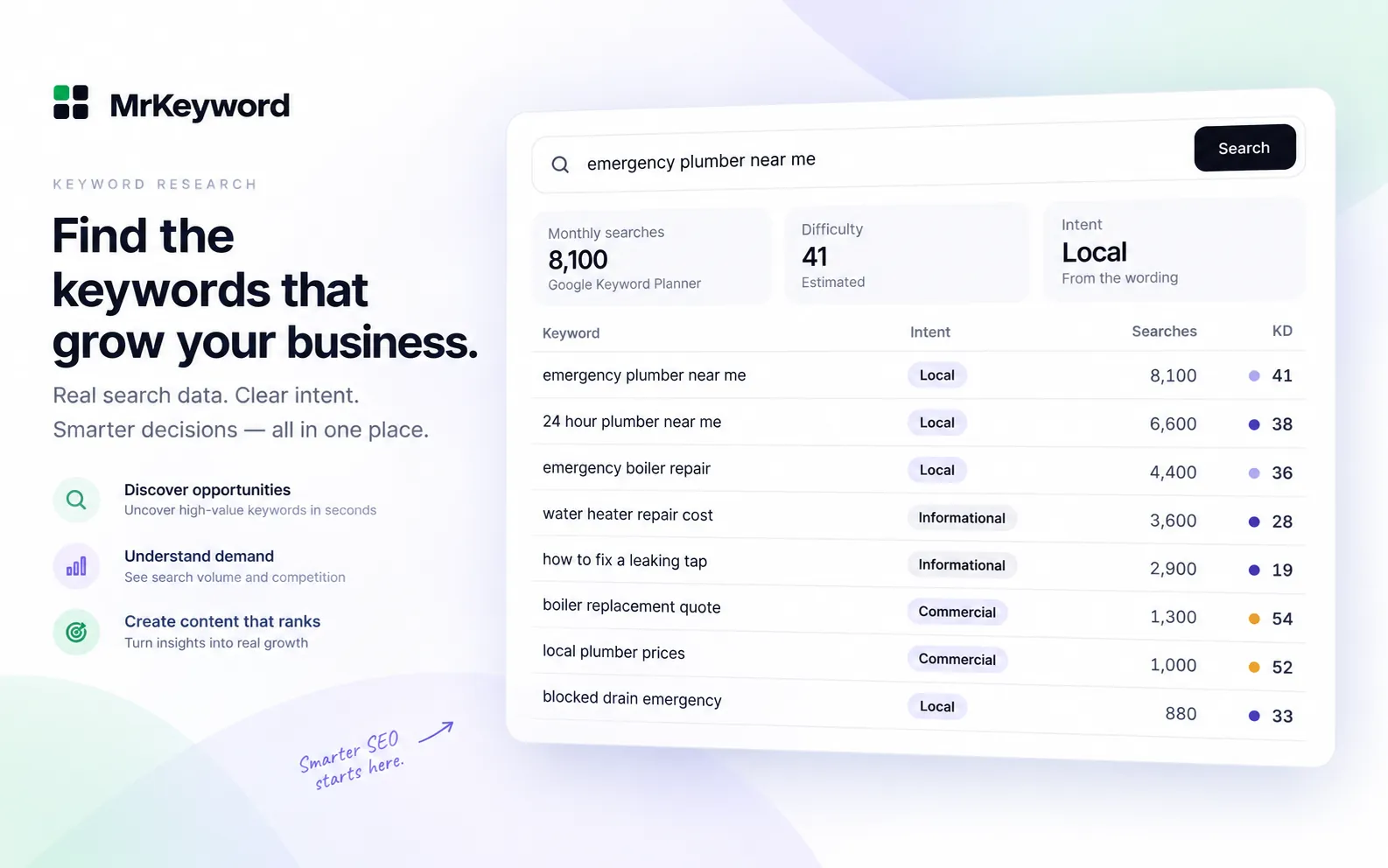
- Search volume is an estimate of how often a keyword is searched per month, usually a 12-month average. Nobody outside Google has the exact count.
- Google Keyword Planner is the free primary source. Google says its figures are rounded, averaged over 12 months by default and include close variants.
- Google Trends does not give search counts. It scales interest from 0 to 100, which is ideal for seasonality and comparing two terms.
- Search Console impressions are real, measured demand for searches your site already shows up for. Use them to check any tool's estimate.
- Tools disagree because they start from different data and models. Pick one source, compare keywords inside it, and check the winners against your own Search Console data.
What is keyword search volume?
Keyword search volume is an estimate of how many times people search for a keyword in a month, in a given country and language. When a tool shows “2,400” next to a keyword, it means roughly 2,400 keyword searches per month on average, not 2,400 visitors you will get. Even if you rank first, only a share of those searchers click.
Three facts shape every number you will see:
- It is an average. Google Ads Help describes Keyword Planner's figure as the average number of times people searched for a keyword and its close variants, averaged over 12 months by default. A seasonal keyword can be far above or below its average in any one month.
- It is rounded. Google states plainly that search volume statistics are rounded, and that volumes for several locations may not add up as expected.
- It merges close variants. Google's historical metrics guide says close variants such as “car” and “cars” are combined into one result. A tool that shows different volumes for the singular and plural is not reading Google's figure directly.
So the honest answer to “how many searches does this keyword get?” is always a rounded estimate. The useful question is which estimate to trust for which decision.
Free keyword search volume tools compared
Four free sources cover almost every search volume question: Google Keyword Planner, Google Trends, Google Search Console and Bing Webmaster Tools. They measure different things, so use them together rather than picking one.
Free sources of keyword search volume
| Source | What it shows | Best for | Limit |
|---|---|---|---|
| Google Keyword Planner | Average monthly searches, a monthly trend, competition and bid ranges | Absolute volume for any keyword | Rounded; needs a Google Ads account with a campaign; very low-volume and sensitive keywords are left out |
| Google Trends | Relative interest from 0 to 100 over time and by region | Seasonality, rising topics, comparing two terms | No search counts at all |
| Google Search Console | Measured impressions, clicks and position for your own site | Real demand for searches you already rank for | Only queries your site appeared for; rare queries are anonymized |
| Bing Webmaster Tools | Keyword research with Bing search volumes | A second, independent opinion | Bing's audience only, which is much smaller than Google's |
How to find search volume in Google Keyword Planner
Google Keyword Planner is the free Google keyword search volume tool: sign in to Google Ads, open Tools → Keyword Planner → Get search volume and forecasts, and paste your keywords. Google's Keyword Planner page calls it a free resource, but you first need to complete Google Ads account setup, including billing details, and create a campaign.
-
Open the right mode
Use Discover new keywords to get ideas from a seed term, or Get search volume and forecasts when you already have a list. The second keeps the results to exactly your keywords.
-
Set the location and language
Volume depends on both. A keyword's US volume and its worldwide volume can differ by an order of magnitude, so match the market you actually sell in.
-
Read Avg. monthly searches
This is the 12-month average. Widen the date range or download the file to see the month-by-month figures and spot seasonality.
-
Ignore what you do not need
Competition and top-of-page bid columns describe advertisers, not organic difficulty. They are useful as a sign of commercial value, not of how hard a keyword is to rank for.
Google's Keyword Planner help adds that keywords with very low search volume, or that are considered sensitive, are not discoverable. A keyword missing from Keyword Planner is not proof that nobody searches it.
Why Keyword Planner shows ranges, and how to get exact-ish numbers
In the Keyword Planner interface, some accounts see volume as a wide range such as 1K–10K instead of a single number; Google's help pages do not spell out exactly when, so treat a range as Google's answer and narrow it with the methods below. A range from 1,000 to 10,000 is too wide to choose between two keywords, but you have options:
- Download the monthly figures. The downloaded file and the trend chart sometimes give you more to compare than the headline range.
- Use the forecast. Keyword Planner's forecast estimates impressions and clicks for a keyword list at a budget. It is an ads forecast, not organic volume, but relative impressions between keywords are a useful tiebreaker.
- Use a tool that reads the Keyword Planner API. Google's Ads API returns an average monthly search figure and up to four years of monthly volumes per keyword, updated monthly from the previous month's data. Several free keyword tools, including MrKeyword's, are built on it.
- Check Search Console. If your site already ranks on page one for the keyword, your impressions are a measured lower bound on real demand. More on that below.
Exact-ish is the right goal. Even Google's own figure is rounded, so two keywords at 1,300 and 1,600 are effectively the same size. Look for differences of several times, not a few percent.
How to use Google Trends for relative search interest
Google Trends shows how interest in a search changes over time and between places, on a scale from 0 to 100; it never shows how many searches a keyword gets. Google's Trends FAQ explains that each data point is divided by total searches in that place and time, then scaled 0 to 100 by the topic's share of all searches. That makes Trends the right tool for three jobs:
- Seasonality. Set five years and see when interest peaks, so you publish and update before the rise, not during it.
- Comparing two wordings. Put up to five terms side by side. If one line sits at 80 and the other at 20, the first is searched about four times as often in that place and period.
- Turning a relative line into a rough count. Get one keyword's monthly volume from Keyword Planner, then use the Trends ratio to estimate a related term Keyword Planner shows as a range. It is a rough method, so treat the result as an order of magnitude.
Google also notes that Trends is a sample of searches, and that regions with the same interest score do not always have the same total search volume. Use it for shape and comparison, never for a count.
Check a keyword's monthly searches, with the source shownMrKeyword's free keyword research tool asks Google Ads Keyword Planner live for every search and shows the figure with its source and time.
Check a keywordHow to use Search Console impressions as real search demand
For any search your site already shows up for, Search Console impressions are measured demand, not an estimate: they count how many times your site appeared in Google results for that query. The Performance report help defines an impression as your site appearing in search results.
-
Open Performance → Search results
Set the last 3 months, tick Impressions and Average position, and open the Queries tab.
-
Filter to page one
Impressions only approach the real number of searches when your page is visible on most searches. Sort by position and look at queries averaging position 1 to 5.
-
Turn it into searches per month
Divide 3-month impressions by 3. For a query where you rank in the top few results, that is a lower bound on monthly searches in Google for your site's audience. Compare it with Keyword Planner's figure.
-
Find demand no tool lists
Long, specific queries often show impressions in Search Console but no volume anywhere else. They are real searches; tools simply round them to zero or leave them out.
Two limits apply. Search Console only covers queries your site appeared for, so it cannot size a topic you have never written about. And Google's deep dive on Performance data explains that rare queries are anonymized and left out of the query rows, and that the interface exports at most 1,000 rows. Our guide to Search Console average position explains why position is an average, and the keyword audit guide shows how to work through the whole export.
How to check search volume in Bing Webmaster Tools
Bing Webmaster Tools includes a free keyword research tool that shows the phrases people search on Bing and their search volumes. Bing describes it in its Webmaster Tools help. You need a Bing Webmaster Tools account, which you can set up by importing your site from Search Console.
Bing's numbers come from Bing's own audience, so they are much smaller than Google's for the same keyword. Do not convert them with a fixed multiplier. When MrKeyword compared Bing counts with published Google volumes for well-known terms, the ratio varied widely by country and by keyword. Use Bing as a second opinion on which of two keywords is bigger, and as volume data for Bing itself.
Why keyword search volume tools disagree
Search volume checkers disagree because each one starts from different raw data, groups keywords differently and fills the gaps with its own model. A free search volume checker and a paid one can show 1,900 and 4,400 for the same keyword, and both can be reasonable.
Where differences between tools come from
| Cause | What happens |
|---|---|
| Source | Some tools read Keyword Planner, some model volume from clickstream panels, some combine several sources. |
| Close variants | Google merges “car” and “cars”; tools that split them show two smaller numbers. |
| Time window | A 12-month average, last month's figure and a 30-day count give different answers for seasonal keywords. |
| Freshness | A stored figure may be months old. Google updates its volumes monthly. |
| Location | Worldwide, one country and one city are different numbers; a default you did not notice changes everything. |
| Ranges | When a source gives a range, some tools show the midpoint as if it were measured. |
The practical rule: choose one tool for one project and compare keywords inside it. Relative size is reliable across sources far more often than the absolute number is.
How MrKeyword's free keyword research tool finds search volume
MrKeyword's free keyword research tool asks the official Google Ads Keyword Planner API live every time you search, and shows Google's monthly figure with its source and the time it was fetched. Nothing is stored and reused, so each figure is Google's current answer.
- Markets. The United States, the United Kingdom, Canada, Australia, India or worldwide.
- What you see. Monthly search volume, a monthly trend chart, an estimated difficulty and the intent behind the keyword, then matching terms, related ideas, questions and modifiers.
- Honesty labels. Volume, difficulty and intent each carry a label (Measured, Derived, Estimated or Not available) with a confidence level and a one-line reason. Where Google only gives a range, you see the range, not an invented midpoint.
- Your own demand beside it. Connect Search Console and the Queries page lists every query your site already appears for, with impressions and position.
- Lookups. One lookup is one live search for one keyword in one market. The Free plan includes 10 a month, a bulk check takes up to 500 keywords, and a failed search is refunded. See pricing for paid plans.
More on the full tool is on the keyword research feature page. If you want to size a whole website rather than a keyword, see our guide on how to check website traffic.
What MrKeyword does not do
- It does not give exact volumes. Keyword Planner publishes rounded figures and ranges, and that is what you see.
- It does not blend Google's figure with a model or another source to make it look more precise.
- Its keyword difficulty is an estimate, labelled as one, not a measurement of the live results page.
- It does not list which keywords another domain ranks for, and it does not scrape Google.
- It does not show search volumes from Bing. For those, use Bing Webmaster Tools directly.
Questions and answers
Keyword search volume questions
How can I find keyword search volume for free?
Use Google Keyword Planner for average monthly searches, Google Trends for relative interest over time, Google Search Console for measured impressions on searches your site already appears for, and Bing Webmaster Tools for Bing volumes. Each is free; Keyword Planner needs a Google Ads account with a campaign set up.
Is Google Keyword Planner free?
Yes. Google describes Keyword Planner as a free resource inside Google Ads. To open it you first complete Google Ads account setup, including billing details, and create a campaign.
Why does Keyword Planner show a range instead of a number?
In the Keyword Planner interface some accounts see search volume as a range such as 1K-10K. Google's help pages do not define exactly when. Tools that read the Keyword Planner API, Google Trends comparisons and your own Search Console impressions can help narrow it.
Does Google Trends show search volume?
No. Google Trends scales search interest from 0 to 100 relative to all searches in that place and time. It is useful for seasonality and comparing terms, not for monthly search counts.
Why do keyword tools show different search volumes?
They use different raw data, merge or split close variants differently, use different time windows and locations, and some fill gaps with their own models. Compare keywords within one tool rather than numbers across tools.
Are Search Console impressions the same as search volume?
Not quite. Impressions count how often your site appeared for a query. For queries where you rank in the top few results, impressions come close to real search demand and work as a measured lower bound.
Sources
- About Keyword Planner forecasts — Google Ads Help, on average monthly searches, close variants and rounding
- Keyword Planner — Google Ads, on Keyword Planner being free and the account setup it needs
- Use Keyword Planner — Google Ads Help, on account setup and keywords that are not discoverable
- Generate historical metrics — Google Ads API, on close variants, monthly volumes and monthly updates
- FAQ about Google Trends data — Google Trends Help, on how interest is normalized and scaled 0 to 100
- Performance report (Search results) — Search Console Help, on impressions, clicks and position
- A deep dive into Search Console performance data filtering and limits — Google Search Central blog, on anonymized queries and row limits
- Refreshed Webmaster Tools — Bing Webmaster Tools Help, on the keyword research feature